

All twelve, side by side
| App | Tasks appear while you talk | Several tasks in one go | Voice on the free plan | Platforms | Paid, per year (US) |
|---|---|---|---|---|---|
| VoiceTask (our pick) | Yes | Yes | Captures every week | iPhone, iPad, Android | $49.99 (Pro) |
| Todoist with Ramble | Yes | Yes | 10 sessions a month | Web, Mac, Windows, Linux, iPhone, iPad, Android, Wear OS (beta) | $60 on the web, $59.99 in the App Store (Pro) |
| TickTick, AI Voice Add | No, processed after you speak (iPhone shows the text live) | Yes | Basic dictation only; AI Voice Add is Premium | Phone apps (AI Voice Add) | $49.99 (Premium) |
| Any.do, Voice Mode | Not stated | Not stated | No, paid plans only | iPhone and web | $59.88 on the web, $59.99 in the App Store (Premium) |
| Saydo | Not stated; you review and confirm after speaking | Yes | “Unlimited voice capture” (Google Play listing) | iPhone, iPad, Android | $39.99 on the web (Pro); the App Store also lists $59.99 |
| TellDone | No, 10 to 30 seconds after you record | Yes | 50 notes and 60 minutes a month | iPhone, Apple Watch, web; Android “in development” | $49.99 (Basic), $119.99 (Pro) |
| Superlist, Talk | No, tasks are written after you confirm | Yes | No, Talk is on paid plans | iPhone, iPad, Android; Mac and web (beta) | $59 (Basic) |
| Voice Do | No, you review after speaking | Yes | Free download; no free limit stated | iPhone, iPad, Mac | $29.99 (Pro) |
| Siri with Apple Reminders | No | One reminder per request in Apple’s examples | Free, built in | iPhone, iPad, Mac, Apple Watch | Free |
| Gemini with Google Tasks | No | Several items to a Keep list; spoken task examples add one at a time | Free | Android, iPhone, iPad and the web (Gemini app) | Free |
| AudioPen | Not a to-do app: turns voice notes into text | Recordings up to 3 minutes | iPhone, iPad, Android, Mac, Windows, web | $99 on the web (Prime) | |
| Voicenotes | A notes and meeting app: turns a finished note into a to-do list | Limited transcription, up to 30 minutes per meeting | iPhone, iPad, Android, Mac, Windows, web, Apple Watch, Wear OS | $90 on the web (Pro, $7.50 a month billed yearly) | |
“Not stated” means the vendor’s pages don’t say either way. US list prices, checked on 25 November 2026; most of these apps charge less in some countries, and some charge a different price in the app than on the web.
VoiceTask (our pick)
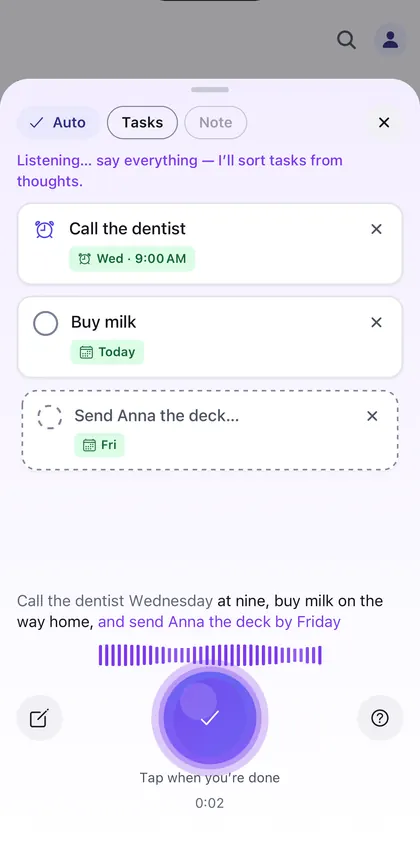
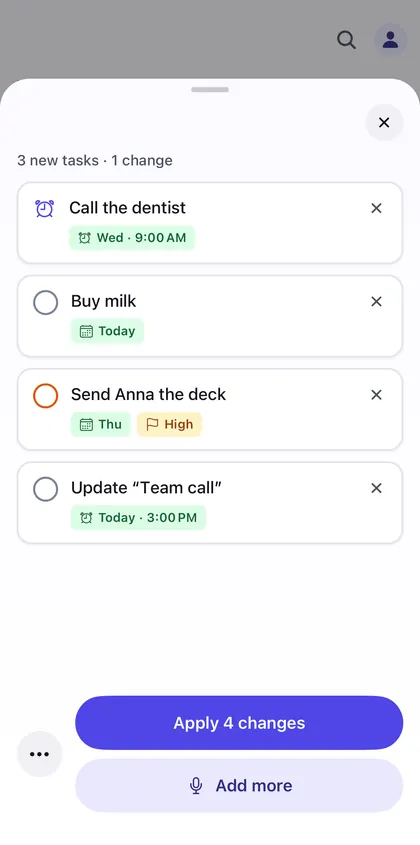
A to-do list and notes app built around talking. You speak, and each task appears as a card next to a live transcript while you are still talking; say “actually, Thursday” and the card changes. Dates, times, reminders (“ten minutes before”), repeats, priorities, projects and sub-tasks are all set by voice, and you can complete, reschedule or move tasks you already have the same way. Voice notes get a transcript, a title, a summary and action items. 40 languages, for speaking and for the whole app.
Good for: people who would rather talk than type, on Android or iPhone. Not for: teams, or anyone who wants to dictate on a computer: VoiceTask Web shows and edits the list in a browser, but voice capture is on the phone. Free plan: voice captures every week and unlimited typing; Pro $9.99 a month or $49.99 a year in the US, 7 days free.
Todoist with Ramble
Todoist’s voice capture. Tasks appear “in real time as you talk”, one recording can become several tasks, and you can correct yourself (“Actually, I meant…”) or drop one (“Remove that”). It runs everywhere Todoist does, including the web, desktop apps and Wear OS (beta), in 40 languages. Todoist’s help lists sub-tasks and custom reminders as things Ramble doesn’t set, and it needs an internet connection.
Good for: people already organized in Todoist, and teams. Free plan: 10 Ramble sessions a month; Pro $7 a month or $60 a year. VoiceTask and Ramble side by side.
TickTick: AI Voice Add
With AI Mode on, you speak, TickTick processes what you said (usually in a few seconds) and shows the tasks it found, split into separate items with dates, lists, tags and priorities, for you to save. It is a Premium feature for the phone apps, with a monthly quota TickTick doesn’t publish and shares with its other AI features. Plain voice input is free: a spoken time becomes the due date and reminder, and its Smart Recognition also picks up repeats and early reminders; only the iPhone app shows your words live while you speak.
Good for: people who want an all-round planner with a calendar and habits and use voice now and then. Premium $49.99 a year. VoiceTask and TickTick side by side.
Any.do: Voice Mode
You talk to Any.do to capture tasks and reminders and can change them while the session is open (“Move that task to tomorrow”). It is on the paid plans only, limited to 20 sessions a day, on iPhone and the web (Any.do’s help page is contradictory about Android).
Good for: Any.do Premium users on iPhone. Premium $4.99 a month billed yearly or $7.99 monthly on the web.
Saydo
A voice planner for iPhone and Android, built “first for ADHD minds”. You talk through what is on your mind; Saydo splits it into separate tasks, calendar events and reminders, shows you what it understood and saves nothing until you confirm. Anything with a time gets a reminder 15 minutes before and another when it starts, or you say “remind me an hour before”; you can also move or cancel plans by voice. It syncs both ways with Google Calendar, and with Apple Calendar on iPhone. Its pages name English and Spanish but give no language count, and the app’s screens are in English.
Good for: people whose day is mostly appointments and who want the reminders to follow through. Pro $39.99 a year or $12.99 a month on the web; the App Store also lists a $59.99 annual plan.
TellDone
A voice planner that works from voice notes: you record, and 10 to 30 seconds later the note has become tasks, calendar events, reminders and notes, including repeating tasks (“remind me to pay rent every month”). The free plan sends them to Apple Calendar and Apple Reminders; paid plans add Google Tasks and one of Todoist, Notion or Microsoft To Do, and Pro adds Things 3. It runs on iPhone, Apple Watch and the web; Android is “in development”. Speech in 60 languages, the app itself in 20.
Good for: iPhone users who want voice notes sorted into the apps they already use. Free plan: 50 notes and 60 minutes a month, with 30 days of Pro to start; Basic $49.99 a year, Pro $119.99 a year.
Superlist: Talk
Superlist is a list and notes app from the team behind Wunderlist; Talk is its voice assistant. You see the recording while you talk, then tap the checkmark and Talk writes the task titles, with due dates and subtasks, or a note or a whole list. Talk lists 37 languages, counting regional variants. It is on the paid plans only, on iPhone and Android, and as a beta on the Mac and the web.
Good for: people who want an all-round list and notes app and add tasks by voice now and then. Basic, which includes Talk, $59 a year or $6 a month.
Voice Do
A small voice to-do list app for iPhone, iPad and Mac. You say several things at once; after you speak it splits them into tasks with dates, priorities, tags and reminders, and you can change any of them before saving. Its notes say it understands more than 50 languages and keeps your words in the language you spoke. It has widgets and iCloud sync, but no calendar or task-app integrations.
Good for: iPhone users who want a simple list they speak into. Free to download, with no free limit stated; Pro $29.99 a year (its other plans are priced differently on its website and in the App Store).
Siri with Apple Reminders
Free and already on your iPhone: “Remind me tomorrow at 3 p.m. to call Tara” and “Remind me to feed the dog every day at 7:30 a.m.” are Apple’s own examples, one reminder per request. An early alert is set by hand in the reminder’s details. On devices with Apple Intelligence, Reminders can also suggest reminders from text in other apps, such as action items from an email.
Good for: a quick single reminder, hands-free, on Apple devices. VoiceTask and Siri side by side.
Gemini with Google Tasks
Free, and since September 2026 the voice assistant on most Android phones, where Google has been phasing out Google Assistant; it also works in the Gemini app on iPhone. Ask “Remind me at 6 to call Sam” or “Add renew passport to my to-dos” and it lands in Google Tasks; Google’s spoken examples add one task per request, and several items can go to a Google Keep list at once. It only works with Gemini’s History setting turned on.
Good for: Android users who already use Google Tasks or Keep. VoiceTask and Gemini side by side.
AudioPen
AudioPen isn’t a to-do list: you ramble, and it turns the recording into tidy text in a style you choose, such as an email or bullet points. Its pages don’t mention tasks or reminders. It is here because people often look for it alongside voice to-do apps.
Good for: writing by voice. Free plan: recordings up to 3 minutes; Prime $99 a year on the web.
Voicenotes
Voicenotes now calls itself “the notetaker for your confidential meetings”. It records and transcribes meetings, memos and dictation and writes summaries, with live transcription on the paid plans. A finished note can become a to-do list, by hand (Create, then To-do list) or automatically with a tag, and the list can go to your Todoist inbox. Its pages don’t mention due dates or reminders. It runs on iPhone, Android, Mac, Windows, the web, Apple Watch and Wear OS.
Good for: meetings and long voice memos that end in a checklist. Free plan: limited transcription, up to 30 minutes per meeting; Pro $7.50 a month billed yearly or $9 a month on the web (App Store prices differ).
Only want the free options? See is there a free voice to-do list app? Leaving Microsoft To Do? See Microsoft To Do alternatives for your phone.
How to choose
For a single reminder now and then, the assistant on your phone is enough. If you want to say a whole list in one go, see it build while you talk and fix it out loud, pick an app made for that: VoiceTask if you mostly capture on your phone and want reminders, repeats and voice notes handled by voice too; Todoist with Ramble if your tasks already live in Todoist or you need a computer and a team; Saydo or TellDone if your day is mostly calendar events. For meetings and long memos, a notes app such as Voicenotes or AudioPen fits better.
Sources
- Todoist: Dictate to add tasks with Ramble and Todoist pricing
- TickTick: AI Voice Add, Smart Recognition, Add Tasks and TickTick Premium
- Any.do: Voice Mode and Any.do pricing
- Apple: Use Reminders and Apple Intelligence suggested reminders
- Google: Capture your tasks and reminders with Gemini Apps and Google: transitioning from Google Assistant to Gemini on mobile
- AudioPen pricing
- Saydo: voice reminders, Saydo on Google Play and in the App Store
- TellDone (features, pricing and FAQ) and TellDone in the App Store
- Superlist: Create tasks and notes with your voice (Talk), Talk languages and Superlist pricing
- Voice Do and Voice Do in the App Store
- Voicenotes pricing, What Voicenotes can do and Voicenotes and Todoist
VoiceTask at a glance
- Works on
- iPhone, iPad and Android phones and tablets, and any browser with VoiceTask Web (app.voicetask.app), synced with the app. Recording by voice happens in the phone app; there is no downloadable Windows or Mac app. AI assistants such as ChatGPT, Claude and Cursor can connect to your VoiceTask account to read and manage your tasks.
- Free plan
- Free voice captures every week, unlimited typing, 3 projects, reminders, calendar sync and voice notes.
- VoiceTask Pro
- Unlimited voice captures and projects for $9.99 a month or $49.99 a year in the US; prices vary by country. Both plans start with 7 days free.
- Languages
- 40, for speaking and for the whole app.
- While you talk
- Live captions, and each task appears as a card before you finish. Say “actually” to change one.
- From one sentence
- Several tasks, with dates, times, reminders, repeats and priorities.
- Voice notes
- A transcript, a title, a short summary and action items you can add as tasks.
- Without opening the app
- Siri, Shortcuts and the Action button on iPhone; a widget and a Quick Settings tile on Android.
- Privacy
- You are asked before any voice is sent. Audio is discarded after transcription, and nothing is sold or used to train AI.
Facts as of 28 November 2026.
Questions people ask
What is the best voice to-do list app?
For saying several tasks at once and watching them appear, VoiceTask (our app) or Todoist’s Ramble. VoiceTask also sets early reminders, repeats and sub-tasks by voice and turns voice notes into action items; Ramble is the better fit if you already use Todoist or need it on a computer. For one reminder at a time, Siri or Gemini is enough.
Is there a voice-activated to-do list?
Yes. Built in, Siri adds reminders to Apple Reminders and Gemini adds tasks to Google Tasks. Apps built for voice, such as VoiceTask and Todoist’s Ramble, go further: you can say several tasks in one go and watch them appear while you talk.
What is the best free voice to-do list app?
For single reminders, the free built-in assistants: Siri with Reminders on Apple devices, Gemini with Google Tasks on Android (and in the Gemini app on iPhone). For several tasks at once, VoiceTask’s free plan includes voice captures every week, Todoist’s free plan includes 10 Ramble sessions a month and TellDone’s free plan, on iPhone, 50 voice notes a month.
Which voice to-do apps work on both Android and iPhone?
VoiceTask, Todoist (Ramble), TickTick, Saydo and Superlist have apps for both. TellDone and Voice Do are on Apple devices only for now; TellDone lists Android as in development. Any.do’s Voice Mode is on iPhone and the web. Siri is Apple-only.
Can AI organize my to-do list from voice?
Yes, that is what these apps do: they listen, split what you say into separate tasks and fill in dates, times and reminders. Check the result before saving; the apps built for voice capture show a preview first or let you undo.
Is AudioPen or Voicenotes a to-do app?
Not mainly. AudioPen turns voice notes into cleaned-up text and its pages don’t mention tasks or reminders. Voicenotes is a note and meeting note-taker that can turn a finished note into a to-do list, without due dates or reminders set by voice.