

What Gemini does well
Since Google began discontinuing Google Assistant on most phones in September 2026, Gemini is the voice assistant on Android, and it is free. Ask “Remind me at 6 to call Sam” or “Add renew passport to my to-dos” and the task lands in Google Tasks (on recent Galaxy phones, Samsung Reminder works too). You can rename tasks, move them to another day, mark them done or delete them by asking. The same works in the Gemini app on iPhone. It needs Gemini’s History setting on; with it off, Gemini can’t reach Google Tasks.
Where VoiceTask goes further
A whole list from one sentence
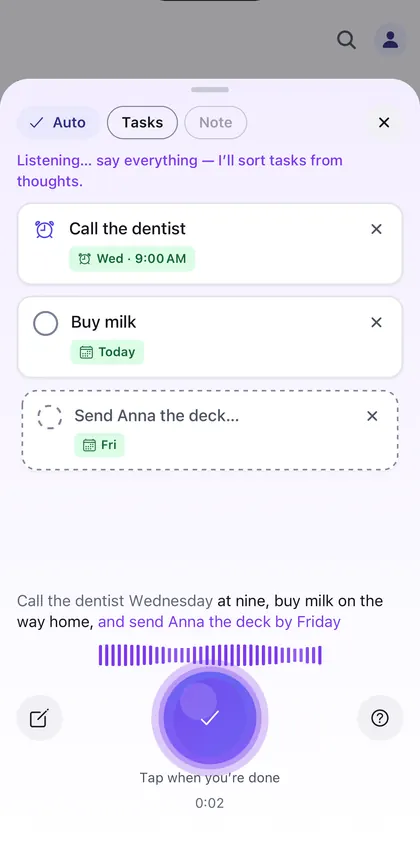
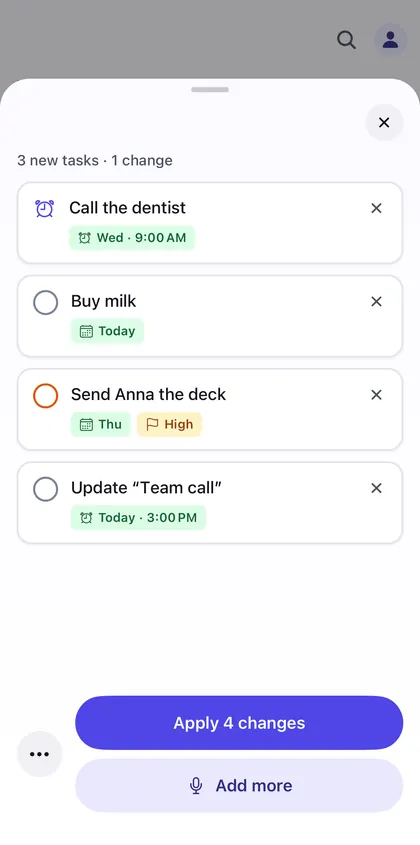
Google’s spoken examples add one task per request. In VoiceTask you talk through everything at once: “call the plumber Friday morning, pick up Max at half past four, and pay the electricity bill by the 20th” becomes three tasks, each with its own date, and you watch each card appear before you finish.
Alerts before, and repeats
Say “dentist on Tuesday at nine, remind me an hour before” and the alert goes off at eight; say “every Monday at seven” and the task repeats. Gemini’s help documents neither by voice.
Change your mind out loud
Say “actually, Thursday” and the card changes while you talk. Nothing is saved until you tap Add.
Voice notes that end in tasks
Record a longer voice note, a meeting or a brain dump, and VoiceTask writes the transcript, a title, a short summary and the action items, each one a tap away from your list.
When Gemini and Google Tasks are enough
If you add one thing at a time and your tasks already live in Google Tasks, Gemini does the job for free, and Google Tasks is on the web too. VoiceTask is for the moments when you have five things on your mind and want them all on the list, dated, before you put the phone down.
All the other voice apps, compared: the best voice to-do list apps. The short answer about Gemini: can Gemini set reminders?
Sources
- Google: Capture your tasks and reminders with Gemini Apps (Android) and (iPhone and iPad)
- Google: Capture your ideas and notes with Gemini Apps (Keep)
- Google: Transitioning from Google Assistant to Gemini on mobile
VoiceTask at a glance
- Works on
- iPhone, iPad and Android phones and tablets, and any browser with VoiceTask Web (app.voicetask.app), synced with the app. Recording by voice happens in the phone app; there is no downloadable Windows or Mac app. AI assistants such as ChatGPT, Claude and Cursor can connect to your VoiceTask account to read and manage your tasks.
- Free plan
- Free voice captures every week, unlimited typing, 3 projects, reminders, calendar sync and voice notes.
- VoiceTask Pro
- Unlimited voice captures and projects for $9.99 a month or $49.99 a year in the US; prices vary by country. Both plans start with 7 days free.
- Languages
- 40, for speaking and for the whole app.
- While you talk
- Live captions, and each task appears as a card before you finish. Say “actually” to change one.
- From one sentence
- Several tasks, with dates, times, reminders, repeats and priorities.
- Voice notes
- A transcript, a title, a short summary and action items you can add as tasks.
- Without opening the app
- Siri, Shortcuts and the Action button on iPhone; a widget and a Quick Settings tile on Android.
- Privacy
- You are asked before any voice is sent. Audio is discarded after transcription, and nothing is sold or used to train AI.
Facts as of 28 November 2026.
Questions people ask
Can Gemini set reminders?
Yes. Say “Remind me at 6 to call Sam” or “Add renew passport to my to-dos” and Gemini saves it in Google Tasks, or in Samsung Reminder on recent Galaxy phones. Gemini’s History setting has to be on.
What happened to Google Assistant reminders?
Since early September 2026 Google has been discontinuing Google Assistant on most phones and tablets (those where Gemini is available); Gemini is now the voice assistant there. Cars with Google built-in and Nest speakers and displays keep Assistant.
Can Gemini add several tasks at once?
Google’s spoken examples add one task per request. You can add several items to a Google Keep list in one request, or several to-dos from a photo of a list. VoiceTask turns a spoken list into separate tasks.
Does VoiceTask work on Android?
Yes, on Android phones and tablets, with a home-screen widget and a Quick Settings tile to start a capture. It is also on iPhone and iPad.
Is VoiceTask free?
Yes. The free plan includes voice captures every week, unlimited typing, 3 projects, reminders, calendar sync, notes and summaries. VoiceTask Pro makes voice captures and projects unlimited, for $9.99 a month or $49.99 a year in the US (prices vary by country), with 7 days free.