VoiceTask Brain dump app
A brain dump app you talk to
A brain dump app lets you empty your head first and sort it afterwards, so you don’t have to organise while you think. In VoiceTask you just talk, in any order, and what you say becomes separate tasks with their dates and reminders, ideas are kept as notes, and nothing is saved until you have checked it.
Updated 18 November 2026.
How a brain dump works in VoiceTask
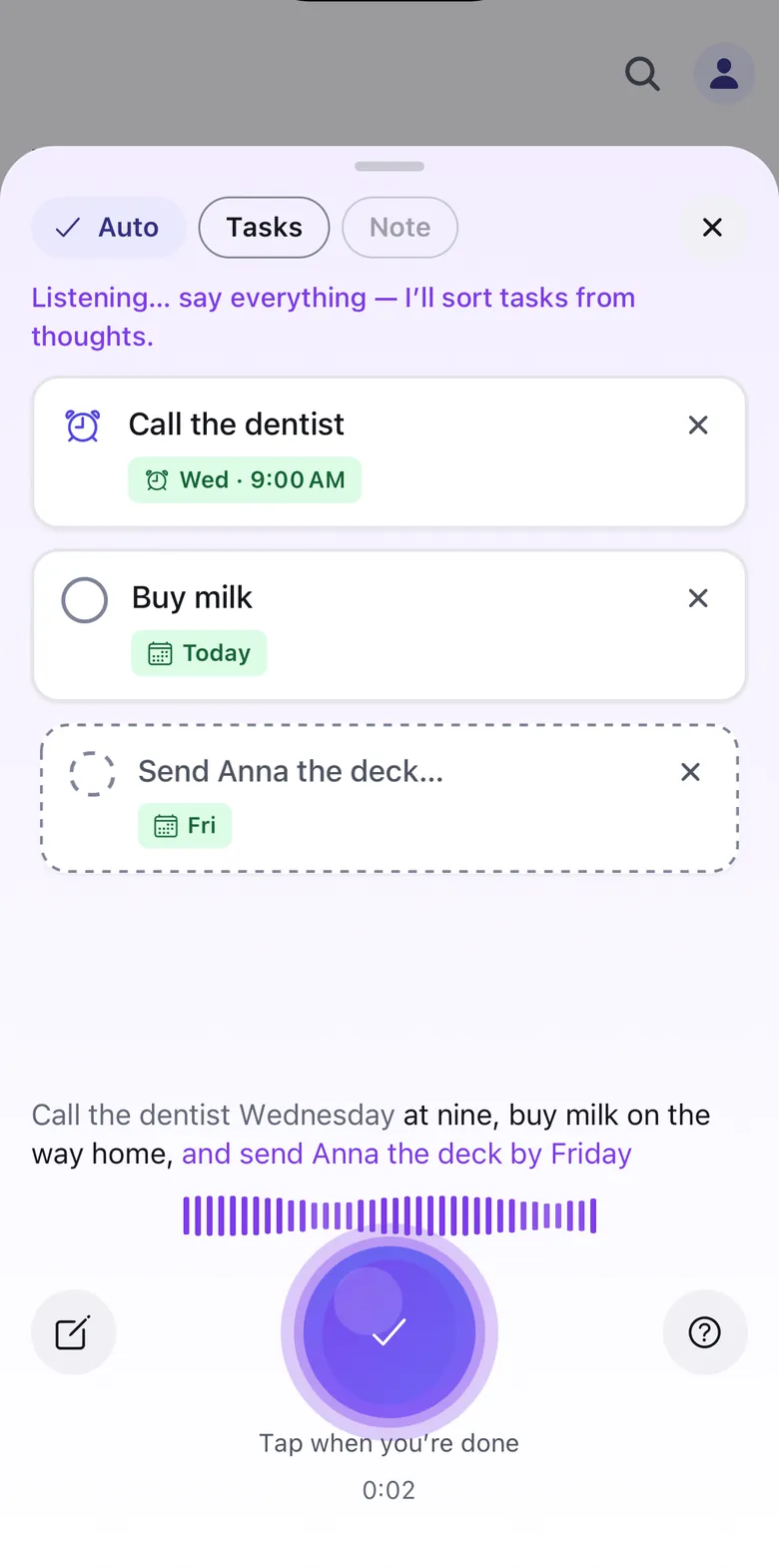
1. Tap the mic and say everything
Open the voice capture and leave it on Auto. Then talk: errands, work, the thing you keep forgetting, the idea you had in the shower. Order doesn’t matter and neither do the ums. Captions run while you speak, and each task appears as a card before you have finished the sentence.
2. Fix it out loud or with a tap
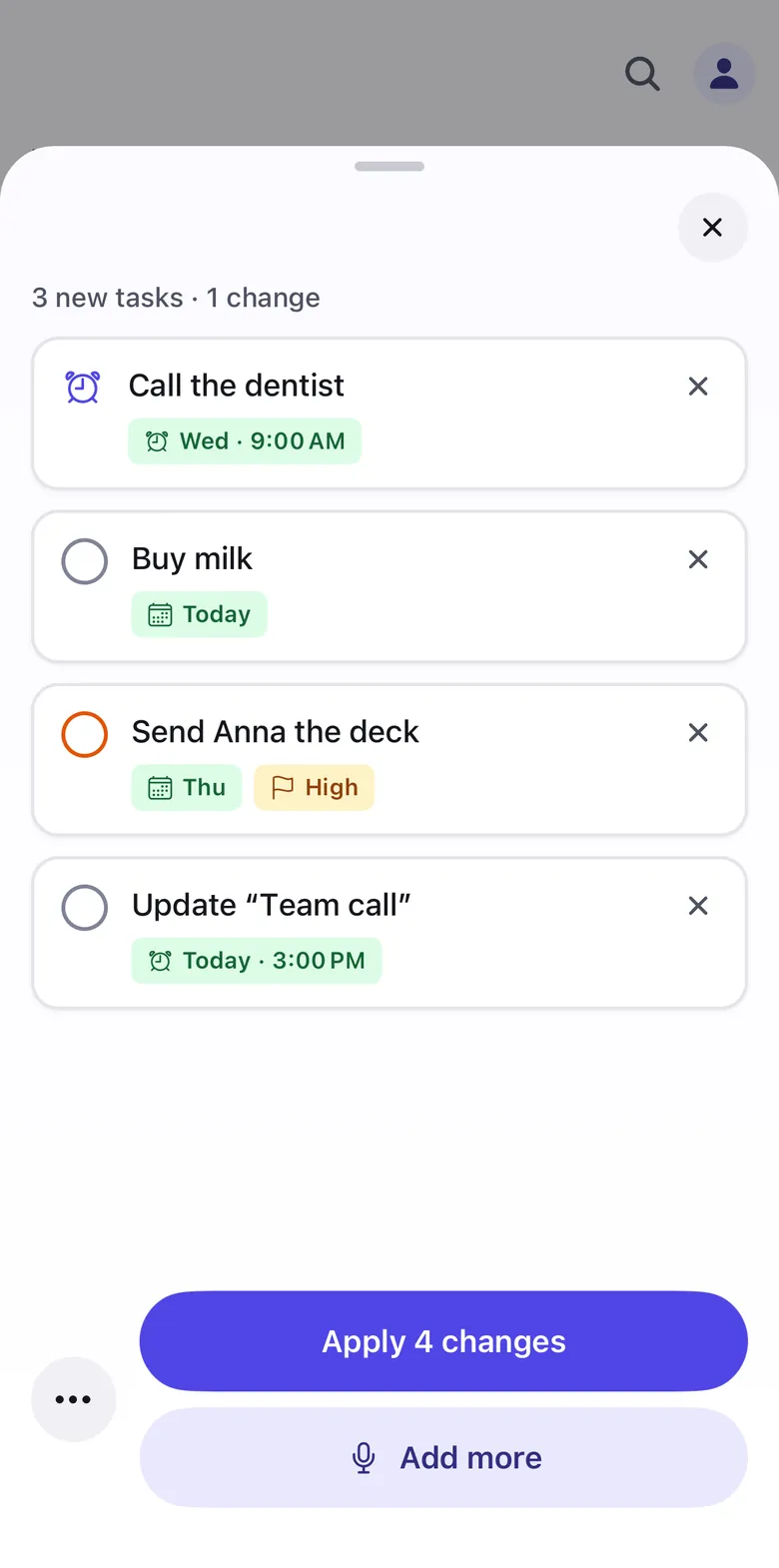
Say “actually, Thursday” to move the last task, or “scratch that” to drop it. When you stop, every card is still a draft: remove one with ×, tap one to edit it, or tap Add more to keep talking. Nothing lands in your list until you tap Add (or Apply, when you have also changed tasks you already had).
3. It ends up where you’ll see it
Tasks with a day go to Today or Upcoming, with their time and reminder. Fresh captures without a date wait on Today under Inbox, where one tap makes them today, tomorrow or someday, or moves them to a project. If you mention something you already have on your list (“the team call is at three now”), VoiceTask changes that task instead of adding a duplicate.
What a spoken brain dump turns into
Here is a typical ramble and what you would see on the review screen. Ideas that aren’t actions are kept as a note, not forced into your list.
| You say | You get |
|---|---|
| “Okay… book the oil change for Saturday,” | A task on Saturday |
| “call Mom on Sunday,” | A task on Sunday |
| “return the library books by Thursday,” | A task due Thursday |
| “pay the electricity bill tomorrow, it’s urgent,” | A task for tomorrow, marked urgent |
| “oh, and an idea: a shared photo album for the trip.” | A note, “Shared photo album for the trip” |
The wording of the titles can differ a little from this example. You see every card before it is saved.
Tips for a better brain dump by voice
- Don’t sort while you talk. One thing after another is enough; a pause or an “and” separates them.
- Say the day when you know it. “On Friday”, “tomorrow morning” or “at six” gives the task a date and time.
- Say “remind me” when you want an alert. Without it you get a task on that day, which is often all you need.
- Name a project if it helps. “Put it in Home renovation” files the task there.
- End with “that’s all” or just tap the button. If something else comes to mind on the review screen, tap Add more.
Want to keep the whole ramble, not just the tasks? Switch to Note: VoiceTask keeps the recording with a transcript, a summary and the to-dos it found. More on that in how to turn voice notes into tasks.
What it doesn’t do
- It doesn’t decide for you. Dates, times and priorities come from what you say. Things without a day wait in the Inbox until you sort them; VoiceTask won’t plan your week on its own.
- It isn’t a journal or a mood tracker. A voice note keeps your words with a transcript and a summary, but there are no prompts, streaks or mood charts.
- No mind maps or boards. Your dump becomes a list of tasks, projects and notes, not a canvas.
- It needs a connection to understand you. If the signal drops, the recording is kept on your phone and becomes a note once you’re back online.
- You speak on the phone. Recording happens in the app on your iPhone, iPad or Android; VoiceTask Web shows and edits the same list in a browser, without a microphone. There are no shared lists.
VoiceTask at a glance
- Works on
- iPhone, iPad and Android phones and tablets, and any browser with VoiceTask Web (app.voicetask.app), synced with the app. Recording by voice happens in the phone app; there is no downloadable Windows or Mac app. AI assistants such as ChatGPT, Claude and Cursor can connect to your VoiceTask account to read and manage your tasks.
- Free plan
- Free voice captures every week, unlimited typing, 3 projects, reminders, calendar sync and voice notes.
- VoiceTask Pro
- Unlimited voice captures and projects for $9.99 a month or $49.99 a year in the US; prices vary by country. Both plans start with 7 days free.
- Languages
- 40, for speaking and for the whole app.
- While you talk
- Live captions, and each task appears as a card before you finish. Say “actually” to change one.
- From one sentence
- Several tasks, with dates, times, reminders, repeats and priorities.
- Voice notes
- A transcript, a title, a short summary and action items you can add as tasks.
- Without opening the app
- Siri, Shortcuts and the Action button on iPhone; a widget and a Quick Settings tile on Android.
- Privacy
- You are asked before any voice is sent. Audio is discarded after transcription, and nothing is sold or used to train AI.
Facts as of 28 November 2026.
Questions people ask
What is a brain dump?
Writing or saying everything that is on your mind, without sorting it, so it stops circling in your head. The sorting comes afterwards: what is a task, what has a date, what is just a thought. A brain dump app does that second part for you.
Is there a free brain dump app?
Yes. The free plan includes voice captures every week, unlimited typing, 3 projects, reminders, calendar sync, notes and summaries. VoiceTask Pro makes voice captures and projects unlimited, for $9.99 a month or $49.99 a year in the US (prices vary by country), with 7 days free.
Is VoiceTask an ADHD app?
No. It is a general to-do list and notes app, not a medical or therapeutic tool, and we make no health claims. Some people simply find it easier to talk a jumble out loud than to type and sort it, and that is what it is built for.
Can I use it as a voice journal?
You can record a voice note about anything. VoiceTask keeps the audio and the transcript, writes a short summary and lists any to-dos it heard, which you can add as tasks. It has no journaling prompts, mood tracking or streaks.
Does it work on iPhone and Android?
Yes. VoiceTask is on the App Store for iPhone and iPad and on Google Play for Android phones and tablets. On a computer, VoiceTask Web shows the same tasks, projects and voice notes in any browser at https://app.voicetask.app, synced with the app: sign in with the account you use on your phone. Recording by voice happens in the phone app. More: https://voicetask.app/web/ You can also connect ChatGPT, Claude, Cursor and other AI assistants to your account: https://voicetask.app/ai-assistants/
Can I brain dump without opening the app?
Yes. On iPhone, start a capture with Siri, a Shortcut or the Action button; on Android, with the home-screen widget or the Quick Settings tile; on both, with a long-press on the app icon.
Does it work in other languages?
Yes, in 40 languages. Speak in any of them and the tasks are written in the language you spoke.

