


What Microsoft announced
On 18 November 2026 Microsoft said it will phase out To Do as personal tasks move into Planner. Its support article spells it out: Microsoft To Do apps will retire on June 30, 2027
, on the web, Windows, Mac, iPhone and Android, for work and school accounts and for personal Microsoft accounts.
- Personal accounts (including Microsoft 365 Personal and Family) don’t get Planner. Microsoft’s advice is to
choose another task-management application that meets your needs
. - Work and school accounts move to Planner, but existing To Do tasks and lists won’t migrate there automatically.
- Your data isn’t deleted on that date, and the service behind To Do retires later. An export tool is promised but not published yet.
So there is time, but not forever. Here is where to go, depending on how you use your list.
VoiceTask (our pick for phones)
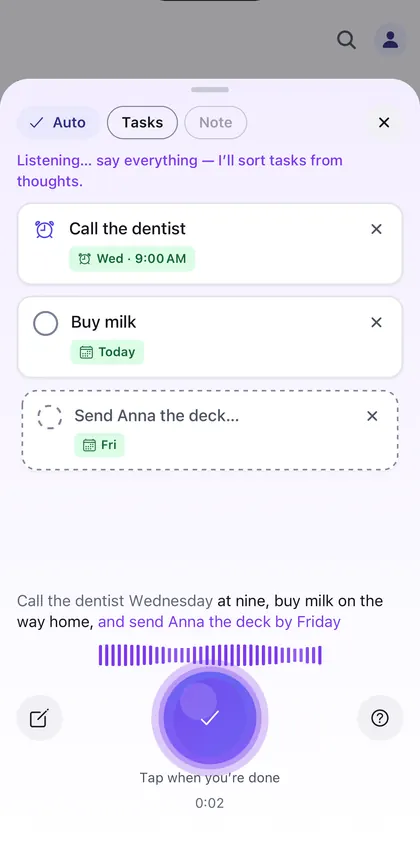
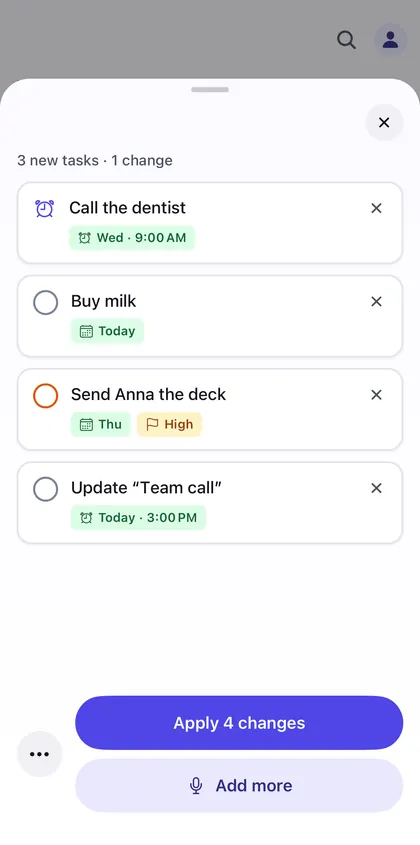
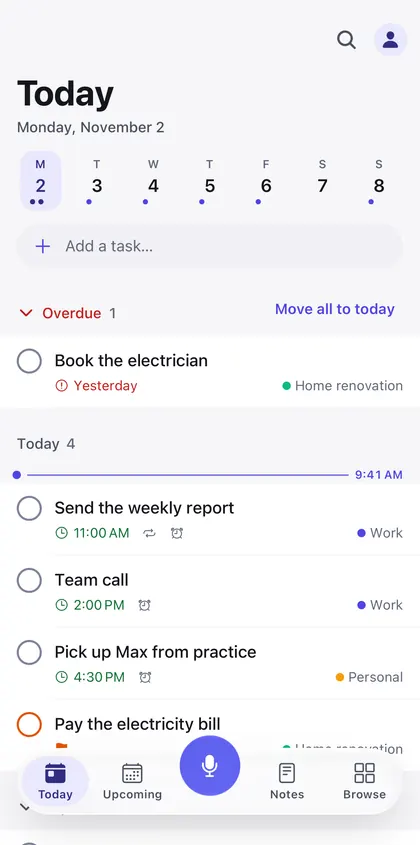
If To Do was mostly the list on your phone, VoiceTask is a fresh start that takes a minute: say what is still open, “renew the passport by the end of the month, call the bank Monday at ten, and every Friday water the plants”, and each task appears while you speak, with its date, reminder and repeat. Nothing is saved until you tap Add. It also records voice notes and turns them into a transcript, a summary and action items. It runs on iPhone, iPad and Android, in 40 languages, and you can start a capture from a widget, Siri, the Action button or Android’s Quick Settings.
Good for: one person’s list, captured on the phone. Not for: anyone who needs an installed Windows or Mac app, shared lists, or an import of their old tasks; VoiceTask has none of those. On a computer, VoiceTask Web runs in the browser.
Todoist
The closest thing to a drop-in replacement. Todoist has an importer for Microsoft To Do that works on every Todoist plan, including Free
: you sign in with Microsoft for read-only access, pick your lists and get an email when it is done. Reminders or files over your plan’s limits are skipped, and a repeating schedule it can’t match comes over as a one-time task. Todoist runs on the web, Mac, Windows, Linux, iPhone and Android, and its Ramble feature turns speech into several tasks while you talk, 10 sessions a month on the free plan.
Good for: moving everything over, including on a PC. Free plan up to 5 projects; Pro $60 a year on the web. VoiceTask and Ramble side by side.
TickTick
TickTick imports from Microsoft To Do directly in its iPhone and Android apps, and from a backup file on the web. It is an all-round planner with a calendar and habits, on the web, Mac, Windows and phones; its AI Voice Add splits a spoken ramble into tasks after you finish speaking, as a Premium feature.
Good for: a planner with more structure than To Do. Free plan up to 9 lists; Premium $49.99 a year. VoiceTask and TickTick side by side.
Apple Reminders
Free on iPhone, iPad, Mac and Apple Watch, with Siri for one reminder at a time, including repeats (“every day at 7:30 a.m.”) and places (“when I get home”). Apple doesn’t document an importer from To Do.
Good for: people who only use Apple devices. VoiceTask and Siri side by side.
Google Tasks
Free, simple, on Android, iPhone and the web, and Gemini adds tasks to it by voice, one per request. Google doesn’t document an importer from To Do.
Good for: people who live in Google’s apps. VoiceTask and Gemini side by side.
Microsoft Planner (work and school accounts)
Microsoft’s own destination for work and school accounts, with an updated My tasks view rolling out from December 2026. Existing To Do tasks don’t move there by themselves, and Microsoft notes that To Do’s list groups have no direct equivalent in Planner.
How to switch without losing anything
- Open To Do and look at what is still open; finished tasks rarely need to move.
- To bring everything over, use Todoist’s or TickTick’s importer. To start fresh on your phone, open VoiceTask and say the open items, list by list.
- Keep To Do until June 2027 as a backup; Microsoft says the retirement doesn’t delete your data on that date.
Comparing voice apps in general? See the best voice to-do list apps.
Sources
- Microsoft: Moving from Microsoft To Do to Microsoft Planner
- Microsoft Planner Blog: Introducing unified tasks and plans (18 November 2026)
- Todoist: Import from Microsoft To Do and Todoist pricing
- TickTick: Data backup and import and TickTick Premium
- Apple: Use Reminders
- Google: Capture your tasks and reminders with Gemini Apps
VoiceTask at a glance
- Works on
- iPhone, iPad and Android phones and tablets, and any browser with VoiceTask Web (app.voicetask.app), synced with the app. Recording by voice happens in the phone app; there is no downloadable Windows or Mac app. AI assistants such as ChatGPT, Claude and Cursor can connect to your VoiceTask account to read and manage your tasks.
- Free plan
- Free voice captures every week, unlimited typing, 3 projects, reminders, calendar sync and voice notes.
- VoiceTask Pro
- Unlimited voice captures and projects for $9.99 a month or $49.99 a year in the US; prices vary by country. Both plans start with 7 days free.
- Languages
- 40, for speaking and for the whole app.
- While you talk
- Live captions, and each task appears as a card before you finish. Say “actually” to change one.
- From one sentence
- Several tasks, with dates, times, reminders, repeats and priorities.
- Voice notes
- A transcript, a title, a short summary and action items you can add as tasks.
- Without opening the app
- Siri, Shortcuts and the Action button on iPhone; a widget and a Quick Settings tile on Android.
- Privacy
- You are asked before any voice is sent. Audio is discarded after transcription, and nothing is sold or used to train AI.
Facts as of 28 November 2026.
Questions people ask
When does Microsoft To Do shut down?
Microsoft says the To Do apps on the web, Windows, Mac, iPhone and Android retire on 30 June 2027, for work, school and personal accounts. The service behind them and its connections to other apps retire later, on dates Microsoft hasn’t announced yet.
What should personal Microsoft account users switch to?
Microsoft says Planner isn’t available for personal accounts, including Microsoft 365 Personal and Family, and tells those users to choose another task app. For a phone-first list you fill by talking, VoiceTask; to import your lists or keep a Windows app, Todoist or TickTick.
Can I export my Microsoft To Do tasks?
Not yet. Microsoft says it will provide an export before the apps retire and publish instructions; it also notes that an export doesn’t mean another app can import it. Todoist and TickTick can already import straight from To Do.
Can VoiceTask import my To Do lists?
No, VoiceTask has no importer. Most people say what is still open in a minute or two; each item becomes a task with its date and reminder.
Is there a Microsoft To Do alternative with voice input?
Yes. VoiceTask is built around voice; Todoist has Ramble, with 10 free sessions a month; TickTick’s AI Voice Add is a Premium feature. Siri and Gemini add one reminder per request.
Is VoiceTask free?
Yes. The free plan includes voice captures every week, unlimited typing, 3 projects, reminders, calendar sync, notes and summaries. VoiceTask Pro makes voice captures and projects unlimited, for $9.99 a month or $49.99 a year in the US (prices vary by country), with 7 days free.