


Where they are the same
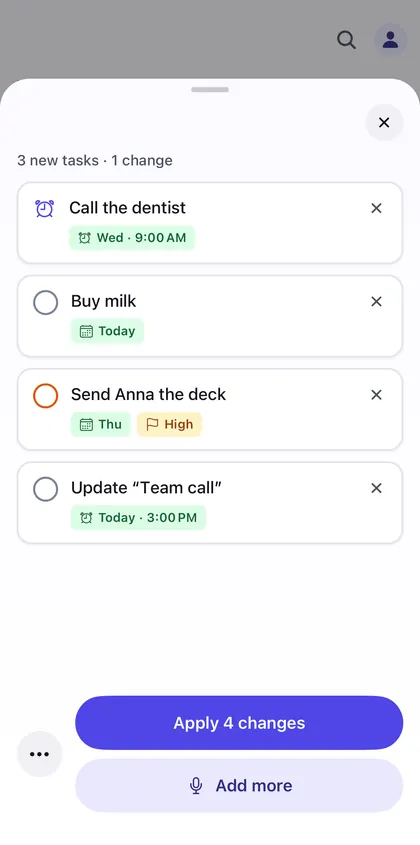
Both turn what you say into tasks with a date, a time and a reminder, and both can split one long sentence into several tasks: VoiceTask always, TickTick with AI Voice Add. Both understand early reminders and repeats in what you say, and both show you the result before it is saved.
Where VoiceTask is different
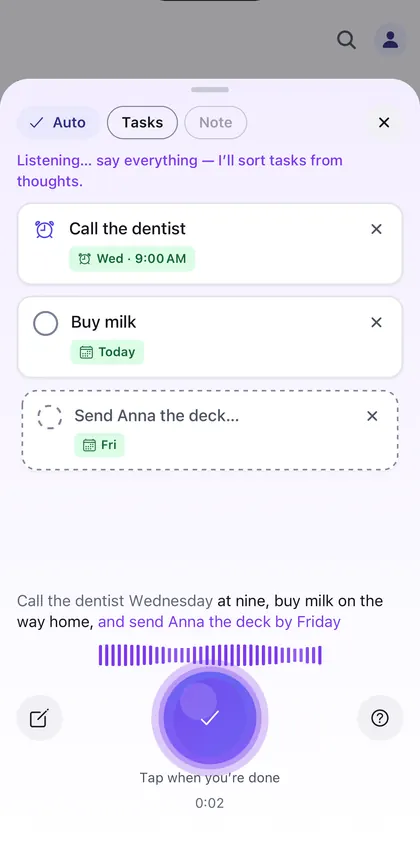
You see the list build while you talk
In VoiceTask each task appears as a card while you are still speaking, next to a live transcript, so you notice a wrong date before you finish the sentence. Say “call the dentist Tuesday at nine, buy milk, and send Anna the deck by Friday, actually Thursday” and you watch three cards form and the last one change. TickTick processes your words after you let go of the button; its help says that usually takes 1–2 seconds, up to 3–5 for longer input.
AI voice capture without Premium
VoiceTask’s free plan includes voice captures every week, with the same AI that splits and dates your tasks. In TickTick, plain voice input is free, but AI Voice Add, the part that splits a ramble into separate tasks with lists and priorities, is a Premium feature with a monthly quota TickTick doesn’t publish.
Voice notes that end in tasks
Record a longer voice note, a meeting or a brain dump, and VoiceTask writes the transcript, a title, a short summary and the action items, each one a tap away from your list. TickTick can record up to 30 minutes into a task; transcribing and summarizing the recording is a Premium feature.
Your existing list, by voice
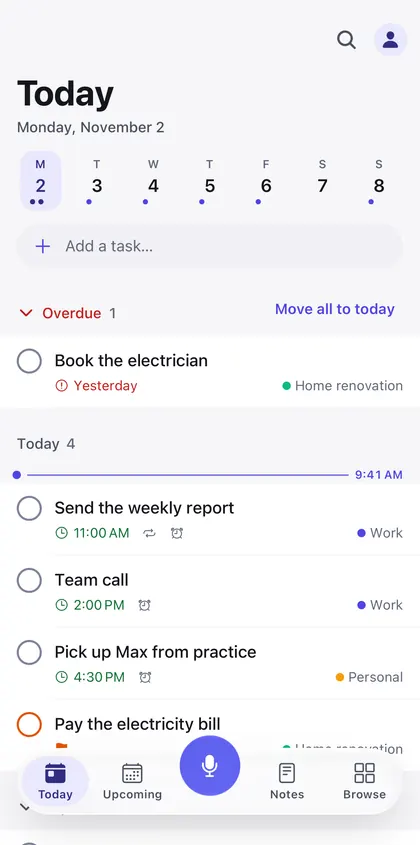
VoiceTask also acts on tasks you already have: “the dentist is done”, “move the report to Monday”. TickTick’s help doesn’t describe changing existing tasks by voice; its AI Assistant takes typed requests.
Where TickTick is the better choice
TickTick is a full planner: lists, a calendar, habits and apps on the web, Mac, Windows, Apple Watch and Wear OS. If you plan at a desk as much as on your phone, or want everything in one app, TickTick fits better, and its free voice input already turns spoken times into reminders. VoiceTask is one person’s list, made for capturing by voice on the phone, with VoiceTask Web for the computer.
Not sure? VoiceTask is free to start, and nothing you say is saved until you tap Add. Try it on the next thing you need to remember.
All the other voice apps, compared: the best voice to-do list apps.
Sources
- TickTick: AI Voice Add and AI Assistant
- TickTick: Add Tasks (voice input and Recording Mode) and Smart Recognition
- TickTick: Transcribe and summarize recordings
- TickTick Premium, TickTick in the App Store and on Google Play
VoiceTask at a glance
- Works on
- iPhone, iPad and Android phones and tablets, and any browser with VoiceTask Web (app.voicetask.app), synced with the app. Recording by voice happens in the phone app; there is no downloadable Windows or Mac app. AI assistants such as ChatGPT, Claude and Cursor can connect to your VoiceTask account to read and manage your tasks.
- Free plan
- Free voice captures every week, unlimited typing, 3 projects, reminders, calendar sync and voice notes.
- VoiceTask Pro
- Unlimited voice captures and projects for $9.99 a month or $49.99 a year in the US; prices vary by country. Both plans start with 7 days free.
- Languages
- 40, for speaking and for the whole app.
- While you talk
- Live captions, and each task appears as a card before you finish. Say “actually” to change one.
- From one sentence
- Several tasks, with dates, times, reminders, repeats and priorities.
- Voice notes
- A transcript, a title, a short summary and action items you can add as tasks.
- Without opening the app
- Siri, Shortcuts and the Action button on iPhone; a widget and a Quick Settings tile on Android.
- Privacy
- You are asked before any voice is sent. Audio is discarded after transcription, and nothing is sold or used to train AI.
Facts as of 28 November 2026.
Questions people ask
Does TickTick have voice input?
Yes. Long-press the + button and speak: TickTick recognizes the date and time and sets the due date and reminder, on the free plan. With Premium, AI Voice Add also splits what you said into several tasks with lists, tags and priorities, after you finish speaking.
Is TickTick’s AI Voice Add free?
No. TickTick’s plan table lists AI voice capture on Premium only ($49.99 a year in the US), with a monthly AI quota that its AI features share.
Can I use VoiceTask on a computer, like TickTick?
Yes, in a browser: VoiceTask Web (app.voicetask.app) shows and edits the same tasks, projects and voice notes, synced with the app. There is no Mac or Windows app to install, and recording by voice happens on the phone. TickTick has apps for the web, Mac and Windows.
Can I move my TickTick tasks to VoiceTask?
There is no importer. Most people start fresh: say what is still open for a minute and VoiceTask turns it into tasks with dates and reminders.
Is VoiceTask free?
Yes. The free plan includes voice captures every week, unlimited typing, 3 projects, reminders, calendar sync, notes and summaries. VoiceTask Pro makes voice captures and projects unlimited, for $9.99 a month or $49.99 a year in the US (prices vary by country), with 7 days free.