VoiceTask AI assistants Claude
Use VoiceTask in Claude and Claude Code
Connect VoiceTask once and Claude can work with the tasks and voice notes you captured on your phone: as a connector on claude.ai, in Claude Desktop and in the mobile apps, and as an MCP server in Claude Code, right next to your code.
Server address (MCP, streamable HTTP)
https://mcp.voicetask.app/mcp
Sign in with your VoiceTask account. Free on every plan.
Claude on the web, desktop and phone
In Claude, VoiceTask is a connector like the ones for your mail or calendar. Ask about your day and Claude reads your list; ask it to plan and it can put the plan back into VoiceTask, with dates and reminders.
Claudeclaude.ai, Claude Desktop and mobile
Add to Claude opens Claude’s add-connector form with the name and address filled in
Click Add to Claude, or open Customize → Connectors in Claude (claude.ai or the desktop app), click Add and choose Add custom connector.
Name it VoiceTask, paste the server address and click Continue.
https://mcp.voicetask.app/mcpKeep the sign-in settings Claude detects (VoiceTask uses OAuth), click Add, then Connect.
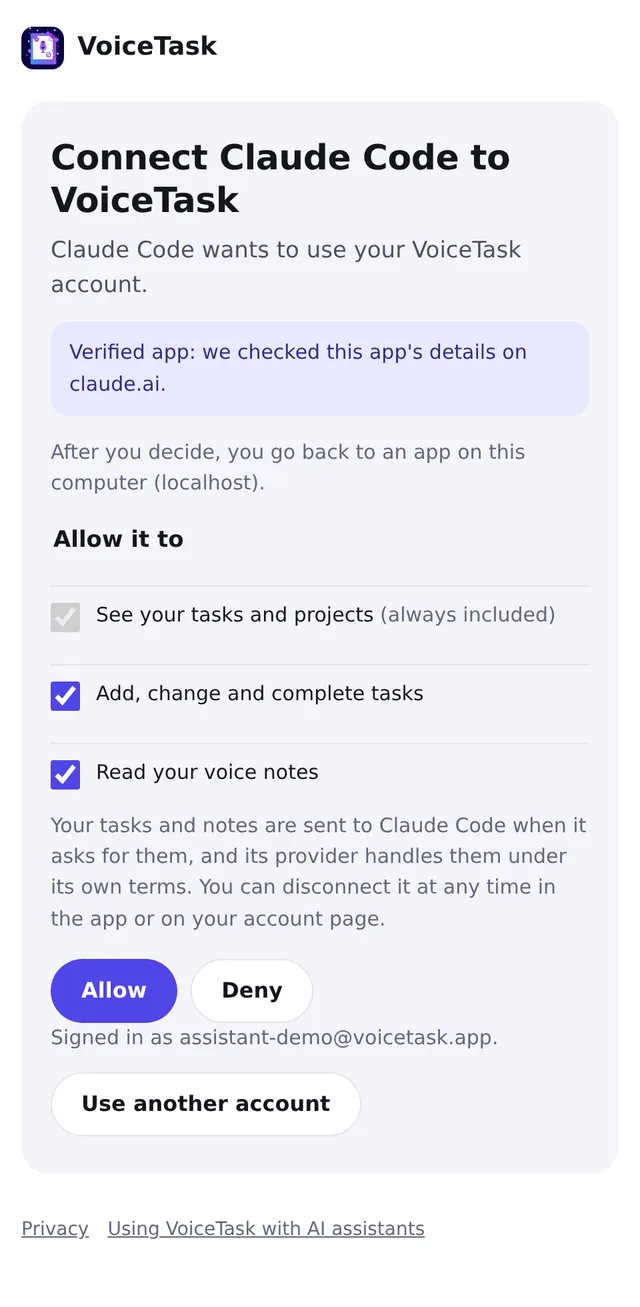
Sign in to VoiceTask and choose what Claude may do. In a chat, switch VoiceTask on under + → Connectors if it isn’t already, and ask away. Once added, it works in the Claude mobile apps too.
Every Claude plan can add custom connectors; the free plan allows one. On Team and Enterprise, an owner adds VoiceTask first under Organization settings → Connectors → Add → Custom → Web, then each member clicks Connect and signs in with their own VoiceTask account.
Check it works: ask “Which VoiceTask account am I connected to?”
- “What’s on my plate this week? Group it by project and flag anything overdue.”
- “Plan tomorrow from my VoiceTask list and my calendar, then set reminders for the three things that matter most.”
- “Read yesterday’s voice note about the renovation and add the action items as tasks in my Home project.”
- “Weekly review: what did I finish, what slipped, and what should I drop?”
Claude Code
The to-dos about your code rarely arrive at the keyboard: they come on a walk, in the car, in the shower. Say them into VoiceTask, and in your terminal Claude Code can read them, plan the work with you and add new tasks as it goes.
Claude Codeterminal, IDE extensions and desktop
Sign in (recommended)
Add the server for all your projects:
Terminalclaude mcp add --transport http voicetask --scope user https://mcp.voicetask.app/mcpIn Claude Code, type
/mcp, choose voicetask and Authenticate. Your browser opens the VoiceTask sign-in. (Or runclaude mcp login voicetask.)
With an API key (headless, CI)
Create a key on your account page, keep it in an environment variable and add the server:
Terminalexport VOICETASK_API_KEY=vt_pat_… claude mcp add --transport http voicetask --scope user https://mcp.voicetask.app/mcp \ --header "Authorization: Bearer $VOICETASK_API_KEY"Or share the server with a project in
.mcp.json; everyone uses their own key from their environment:.mcp.json{ "mcpServers": { "voicetask": { "type": "http", "url": "https://mcp.voicetask.app/mcp", "headers": { "Authorization": "Bearer ${VOICETASK_API_KEY}" } } } }
Check it works: ask “Which VoiceTask account am I connected to?”
- “What did I note about this repository in VoiceTask this week?”
- “Take the open tasks in my Side project and suggest which one to do first in this codebase.”
- “When the tests pass, tick off ‘fix the login redirect’ in VoiceTask.”
- “Add a task for tomorrow at 9: review the pull request you just opened.”
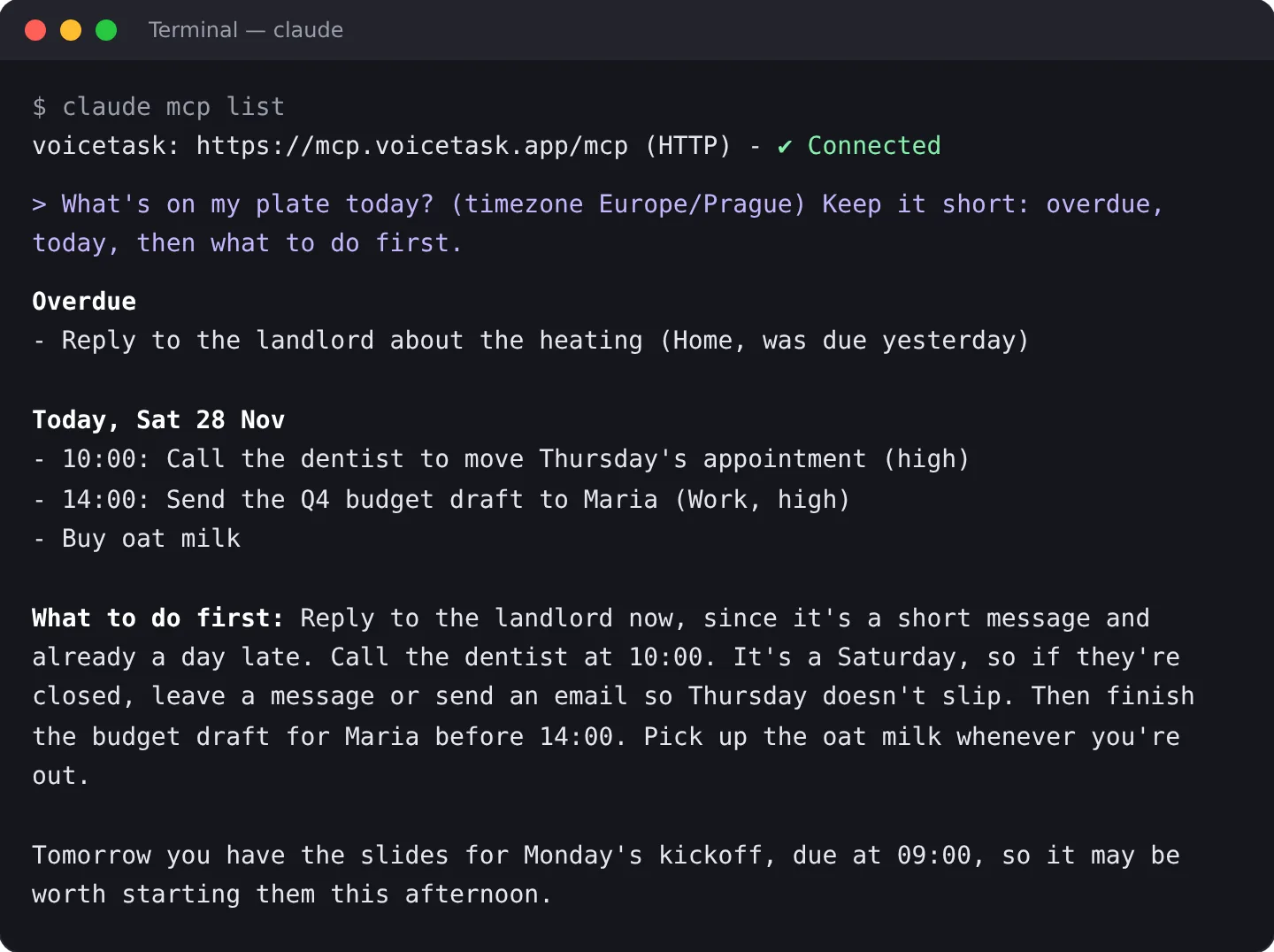
claude mcp list and its output; then the prompt as it was typed and Claude Code’s reply, word for word.Good to know
- One account, everywhere. The connector on claude.ai, Claude Desktop and Claude Code all sign in to the same VoiceTask account, each with its own permissions.
- Read-only is an option. Untick “Add & edit tasks” at sign-in and Claude can only read. That is a good default for agents that run unattended.
- Reminders ring on your phone. A task Claude adds gets its reminder the next time VoiceTask syncs on your phone, usually when you open the app.
- What Claude reads is handled under its own terms. Tasks and notes become part of your conversation in Claude, under its settings and privacy policy. See privacy, in plain words.
VoiceTask at a glance
- Works on
- iPhone, iPad and Android phones and tablets, and any browser with VoiceTask Web (app.voicetask.app), synced with the app. Recording by voice happens in the phone app; there is no downloadable Windows or Mac app. AI assistants such as ChatGPT, Claude and Cursor can connect to your VoiceTask account to read and manage your tasks.
- Free plan
- Free voice captures every week, unlimited typing, 3 projects, reminders, calendar sync and voice notes.
- VoiceTask Pro
- Unlimited voice captures and projects for $9.99 a month or $49.99 a year in the US; prices vary by country. Both plans start with 7 days free.
- Languages
- 40, for speaking and for the whole app.
- While you talk
- Live captions, and each task appears as a card before you finish. Say “actually” to change one.
- From one sentence
- Several tasks, with dates, times, reminders, repeats and priorities.
- Voice notes
- A transcript, a title, a short summary and action items you can add as tasks.
- Without opening the app
- Siri, Shortcuts and the Action button on iPhone; a widget and a Quick Settings tile on Android.
- Privacy
- You are asked before any voice is sent. Audio is discarded after transcription, and nothing is sold or used to train AI.
Facts as of 28 November 2026.
Questions about Claude
Which Claude plans can add VoiceTask?
Every plan can add custom connectors; the free plan allows one. On Team and Enterprise, an owner adds VoiceTask for the organization first, then each member connects their own VoiceTask account.
Does it work in the Claude mobile apps?
Yes. Add the connector on claude.ai or in Claude Desktop, and it is available in the Claude apps for iPhone and Android as well.
How do I use it in Claude Code without a browser?
Create an API key on mcp.voicetask.app/account and add the server with the key as an Authorization header, as shown above. That also works for scheduled jobs and CI.
Can Claude Code add tasks while it works?
Yes, if you allowed “Add & edit tasks”. For example: “When you’re done, add a task to write the release notes for Friday.” Claude Code asks before using a tool unless you have allowed it.
Is VoiceTask in Claude’s connector directory?
Not yet. Until it is, add it as a custom connector with the button or the steps above.
How do I disconnect Claude?
In the VoiceTask app under Settings → Connected assistants, on mcp.voicetask.app/account, or by removing the connector in Claude (in Claude Code: claude mcp remove voicetask). Access stops at once.
Related
Setup steps checked against each app’s own help pages on 28 November 2026.

